
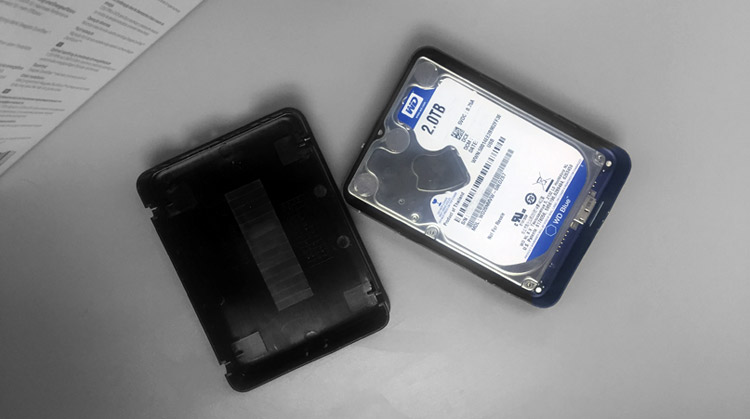
Dropping a hard drive does not always produce an obvious failure immediately. A drive may continue to spin, appear normally in the computer, or even allow files to be opened after the impact.
That does not necessarily mean the drive escaped damage.
Mechanical hard drives contain components operating at extremely small clearances. A physical impact can affect the read/write heads, head suspension, parking mechanism, spindle assembly, platter surfaces, or other internal parts. What happens next depends on whether the drive was running when it fell, how severe the impact was, and whether it was powered on afterward.
If you have dropped a hard drive containing important data, the most important decision is usually what you do after the drop.
What Can Happen When a Hard Drive Is Dropped?
Inside a mechanical hard drive, data is stored on rapidly rotating magnetic platters. Read/write heads move across those platters while the drive operates. You can see the major internal components in our hard drive teardown and component guide .
A sudden impact can disturb this mechanical system in several different ways. The result can range from a drive that still appears to work normally to one that immediately begins clicking, beeping, or failing to spin.
Read/Write Head Damage
The head stack assembly is particularly vulnerable to physical shock. A hard impact can deform or damage the heads or their suspension.
If the heads can no longer read the platter surfaces correctly, the drive may repeatedly attempt to initialize and produce a rhythmic clicking sound.
You can hear examples and learn more about this symptom in our article on clicking hard drives .
Heads Can Become Stuck or Mispositioned
Depending on the drive design and the nature of the impact, the heads may no longer return to or leave their normal parking position correctly.
In some failures, the heads can become positioned over the platter surfaces when they should not be.
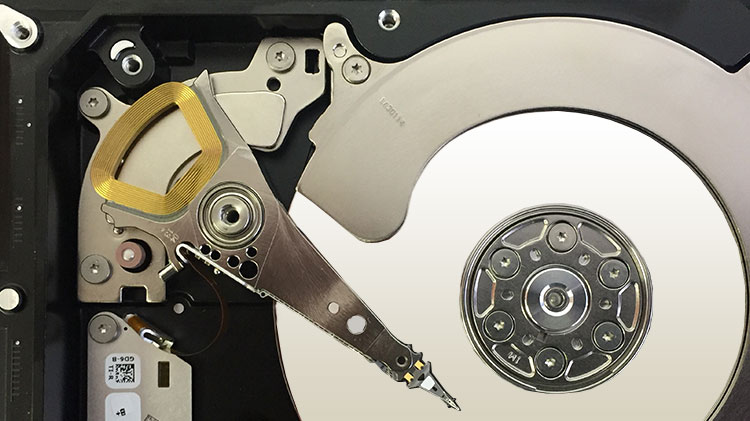
Applying power in this condition can create additional mechanical contact or surface damage.
Platter Surface Damage
One of the more serious consequences of a drop is contact between a damaged head assembly and the platter surface.
If the platter begins rotating while a damaged component is touching it, the surface can be scratched. Because the platters rotate at high speed, even a small damaged area can spread debris or affect additional portions of the recording surface.
This is one reason repeated power-on attempts can turn a recoverable mechanical failure into a substantially more difficult case.
For a more detailed explanation, see our article about scratched hard drive platters .
Spindle or Bearing Damage
The impact can also affect the spindle motor or bearing system that rotates the platters.
A drive with this type of damage may fail to spin normally, spin inconsistently, or produce unusual mechanical sounds when power is applied.
The Damage May Not Be Immediately Obvious
Not every dropped hard drive begins clicking.
A drive can still mount, identify correctly, or allow files to be copied while having suffered physical damage. In other cases, the external enclosure may have absorbed much of the impact and the internal drive may remain operational.
The difficulty is that normal operation immediately after the drop does not prove that the drive is mechanically healthy.
Does It Matter Whether the Drive Was Running When It Fell?
Yes.
A hard drive that is operating when it experiences an impact presents a different risk from a drive that is powered off.
When the drive is running, the platters are already rotating and the heads are actively positioned over the recording surfaces. A sufficiently strong impact can disturb that relationship immediately.
When the drive is powered off, the heads are normally parked away from the active platter area on modern drives. That can reduce certain risks, but it does not make a powered-off drive immune to mechanical damage.
The safest response after either type of drop is to avoid unnecessary testing when the data is important.
I Dropped My Hard Drive but Have Not Turned It On
If the data is important and the drive has not been powered on since the fall, there is usually little benefit in powering it on simply to find out whether it still works.
That test can answer your curiosity, but it can also introduce the first post-impact mechanical movement inside the drive.
If internal components were displaced or damaged during the fall, powering the drive may allow those parts to contact the platter surfaces.
For important or irreplaceable data, leaving the drive powered off preserves the condition in which it arrived after the accident.
I Powered It On and Now It Clicks
If the drive began clicking after it was dropped, turn it off.
Repeated clicking commonly means the drive is failing to complete its normal initialization or cannot reliably read the information it needs from the disk. After a physical impact, mechanical damage is one of the possibilities that must be considered.
Do not repeatedly reconnect the drive to see whether it eventually starts working.
A damaged drive does not normally improve through repeated power cycles, and continued operation can increase the amount of media damage in some failure conditions.
I Powered It On and It Beeps or Does Not Spin
A beeping or buzzing sound after a drop can indicate that the motor is unable to rotate the platter assembly normally, although several different mechanical conditions can produce similar symptoms.
Avoid repeatedly applying power.
The important point is not to diagnose the exact internal failure from the sound alone. The sound is evidence that the drive is not operating normally after a physical event.
The Drive Still Works. Should I Keep Using It?
If a dropped hard drive is still accessible, the safest approach depends on the importance of the data.
If the contents already exist elsewhere and the drive contains nothing important, replacing the drive is generally preferable to trusting a storage device that has experienced a significant physical impact.
If the drive contains the only copy of important data, continuing to browse folders, run tests, perform surface scans, or use repair utilities introduces additional disk activity.
In that situation, the priority should be preserving the data rather than testing the health of the drive.
Do Not Run CHKDSK, Repair Utilities, or Surface Tests
Software cannot repair physical damage inside a hard drive.
Utilities such as CHKDSK, filesystem repair tools, SMART tests, and full surface scans cause the drive to perform additional reads and, in some cases, writes. Those tools can be useful in appropriate logical-failure situations, but they are not a first response to a drive that has just experienced physical shock.
If the drive is mechanically unstable, minimizing unnecessary operation is usually more important than obtaining a health score.
Do Not Open the Hard Drive
A mechanical hard drive should not be opened simply to inspect what happened inside.
Removing the top cover exposes the platter assembly to airborne contamination and does not provide a meaningful diagnostic advantage without the equipment, parts, and procedures required for mechanical recovery.
A visibly displaced head assembly or platter does not become easier to recover because the cover was removed at home.
Professional mechanical work is normally performed in a controlled clean environment using appropriate tools and donor components.
You can read more about the equipment used in this type of work in our guide to professional data recovery laboratory tools .
What About an External Hard Drive?
An external hard drive contains a hard drive mechanism inside an additional enclosure.
Sometimes the enclosure, USB connector, interface board, or cable is damaged while the internal drive remains functional.
In other cases, the impact reaches the internal hard drive and causes the same mechanical problems described above.
For that reason, a dropped external hard drive should not automatically be treated as a simple USB or enclosure problem, particularly if it begins clicking, beeping, repeatedly disconnecting, or failing to spin.
Can Data Be Recovered From a Dropped Hard Drive?
Often, yes, but the answer depends on what was physically damaged.
A drive with damaged heads but intact platter surfaces presents a very different recovery problem from a drive where prolonged operation has caused significant platter damage.
Professional diagnosis may involve examining the drive’s mechanical condition, electronic behavior, firmware access, read stability, and the condition of the recording surfaces before choosing a recovery strategy.
When mechanical components must be replaced, a compatible donor drive may be required. We explain that process in more detail in our article on hard drive donor compatibility .
What Should You Do Immediately After Dropping a Hard Drive?
For important data, the safest general sequence is straightforward:
- Disconnect the drive if it is behaving abnormally.
- Avoid repeated power-on attempts.
- Do not run CHKDSK, repair software, or full surface scans.
- Do not open the hard drive.
- Keep the drive protected from additional shock during transport or storage.
- Decide how important the data is before performing further testing.
If the data is not important, replacing the drive may be the simplest option. If the data is important, preserving the current condition of the media becomes the priority.