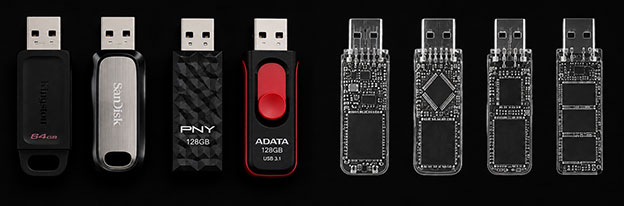
Aesonlabs provides professional data recovery from failed, damaged and non-responsive USB flash drives. We recover data from conventional USB flash drives, monolithic flash devices and other removable flash storage affected by controller failure, NAND degradation, electronic faults, damaged connectors, firmware and translation problems, encryption, physical damage and logical corruption.
Although USB flash drives appear simple from the outside, their internal construction can vary considerably. Some use a conventional controller and separate NAND packages on a printed circuit board, while others use highly integrated monolithic designs where much of the circuitry is embedded inside a compact package.
Diagnosis Before NAND Work
The Exterior Brand Does Not Determine the Recovery Method
Two flash drives with similar branding or capacity can contain completely different controllers, NAND memory and firmware. The first objective is to determine the actual construction and failure before selecting a controller-based, electronic, monolithic or direct NAND recovery procedure.
A non-responsive device does not automatically have failed NAND, and removing NAND memory simply because a flash drive is not detected can create unnecessary work.
USB Flash Drive Problems We Recover
Flash drives can fail suddenly or gradually. Some become completely undetectable, while others begin disconnecting, overheating, reporting the wrong capacity or producing increasing numbers of read errors.
Detection Failure
USB Flash Drive Not Detected
A device that no longer appears in Windows, macOS or Disk Management may have a controller, firmware, NAND, electronic or USB-interface fault.
Some controllers still communicate diagnostically even when normal user-data access is unavailable.
Physical Damage
Broken USB Connector
Bent, broken or separated USB connectors can tear solder pads and copper traces from the PCB.
When damage is limited to the connector or nearby circuitry, temporary electrical access may be restored for controlled imaging.
Electronic Damage
Overheating, Liquid and Corrosion
Abnormal heat can indicate excessive current draw, shorted components, controller failure or damaged power circuitry. Liquid exposure can add corrosion and unstable electrical connections.
An overheating or contaminated device should not be repeatedly powered in different computers.
Abnormal Identification
Wrong Capacity or Generic Identification
A failed flash drive may continue to identify while reporting an incorrect capacity, generic device information or abnormal parameters.
This can involve controller firmware, NAND configuration or logical-to-physical translation information.
NAND Instability
Freezing, Disconnecting or Read Errors
Degrading NAND can make a flash drive extremely slow, unstable or difficult to read while the controller struggles with increasing error correction and failing regions.
Repeated copy attempts can make an already unstable recovery situation more difficult.
Logical Data Loss
Deleted, Formatted or Corrupted Data
When the device remains physically healthy, recovery may be possible following accidental deletion, formatting, lost partitions or filesystem corruption.
The original flash drive should be protected from unnecessary writes because continued use can overwrite recoverable information.
Construction Matters
Conventional and Monolithic Flash Drives Require Different Access Strategies
There are thousands of flash-drive variations, so a giant compatibility graphic would add complexity without helping most visitors. The useful distinction is the construction of the patient device and whether the original controller path can still be used.
01Conventional Construction
Controller + Separate NAND Packages
A conventional flash drive typically contains a PCB with a USB connector, controller, one or more NAND memory packages and supporting electronics. These elements can often be examined individually during diagnosis.
USBCTRLNANDNAND
02Monolithic Construction
Integrated Controller, NAND and Internal Routing
Monolithic flash devices integrate major functions into a compact package or substrate. There may be no conventional NAND package to remove, and recovery can require X-ray inspection, microscopy and access to hidden internal test points.
CONTROLLERNANDROUTINGTEST POINTS
Professional Recovery Workflow
How Professional USB Flash Drive Recovery Works
The objective is to stabilize the device and acquire its contents with the least invasive method appropriate to the failure. Direct NAND work is only one possible path.
01
Diagnosis
Inspect construction, connector damage, PCB condition, power behaviour, controller response, NAND configuration and abnormal heating.
02
Stabilization & Access
Repair connector or electronic faults where appropriate and determine whether controller-specific technological access is available.
03
Data Acquisition
Image through the original controller when possible, or acquire NAND memory directly when controller-based access is unavailable or unsuitable.
04
NAND Reconstruction
Correct ECC, remove scrambling, reconstruct pages, blocks and interleave, handle bad blocks and rebuild controller-specific translation.
05
Filesystem Reconstruction & Verification
Analyze the resulting logical image for partitions, directories and files, and verify the recovery result from the acquired data rather than repeatedly operating the original failed device.
Controller, NAND & Reconstruction
Advanced Flash Recovery Depends on the Actual Architecture
Controller-Specific Access
PC-3000 Flash and Controller Families
Aesonlabs uses professional PC-3000 Flash technology for supported controller and NAND combinations. Flash storage can use controller families from Phison, Silicon Motion, Alcor Micro, ChipsBank, Innostor and many others.
Support is determined by the actual controller, firmware and NAND combination rather than the retail brand printed on the enclosure.
Unusual / Unsupported Controllers
No Ready-Made Procedure Does Not Automatically Mean No Recovery
New, obscure, relabelled or poorly documented controllers may not have an established automated recovery solution.
Electronic diagnosis, controller analysis, direct NAND access and case-specific engineering may still provide another path depending on the architecture and NAND condition.
Raw NAND Reconstruction
Reading NAND and Recovering Files Are Separate Stages
A raw NAND dump can contain the correct physical memory contents while remaining unusable as a conventional filesystem image.
Reconstruction can require ECC processing, XOR or scrambling analysis, block and page reassembly, interleave reconstruction, bad-block handling and logical translation.
Encryption
Raw NAND Access Does Not Automatically Bypass Encryption
Some controllers perform hardware encryption or internal data transformations during normal operation. Security-focused flash drives may add password- or key-based protection.
Recovery can depend on preserving or restoring the original controller context and on the availability of any required password, key or credentials.
Non-Invasive Diagnostics
Why Thermal Imaging and X-Ray Can Matter Before NAND Removal
Thermal imaging can reveal abnormal current consumption and localized hotspots, while X-ray examination can reveal hidden traces, internal routing and monolithic construction.
These methods can help distinguish a repairable electronic fault from a controller or NAND failure and can prevent unnecessary invasive work.
Fraudulent devices can report much more capacity than physically exists. Once writes exceed the real NAND capacity, new information may overwrite earlier data or be directed to locations that do not exist.
Recovery is limited to information that still physically exists within the genuine NAND memory.
Devices We Recover
USB Flash Storage Across Conventional, Monolithic and Security-Focused Designs
Aesonlabs works with current and legacy devices from manufacturers including SanDisk, Kingston, Lexar, Verbatim, PNY, ADATA, Corsair, Transcend and many others, as well as unbranded and generic flash storage.
What Not to Do With a Failed USB Flash Drive
Do not repeatedly plug and unplug a flash drive that is overheating or repeatedly disconnecting.
Do not initialize or format the device because the operating system asks you to.
Do not run CHKDSK or filesystem-repair utilities on an unstable flash drive.
Do not continue large file-copy attempts when the device repeatedly freezes or disappears.
Do not apply uncontrolled heat to the controller or NAND memory.
Do not remove NAND memory simply because the device is not detected.
Do not scrape or expose monolithic test points without understanding the internal layout.
Do not repeatedly resolder a damaged USB connector when PCB pads or traces have already been torn.
Do not write new data to a device containing deleted or accidentally formatted files.
Why Aesonlabs
Flash Recovery Based on the Actual Controller, NAND and Failure
USB flash drive recovery is performed directly by Aesonlabs rather than being forwarded to an unknown third-party laboratory. Each device is evaluated according to its actual construction, controller, NAND configuration and failure rather than simply by the brand or capacity printed on the enclosure.
Recovery work can involve electronic diagnosis, thermal imaging, X-ray inspection, microscopic PCB work, PC-3000 Flash technological access, monolithic recovery, direct NAND acquisition and controller-specific reconstruction.
Frequently Asked Questions
USB Flash Drive Data Recovery FAQ
Potentially. A completely non-responsive flash drive may have a failed USB connector, damaged power circuitry, controller failure, firmware problems or NAND-related faults. Diagnosis is required to determine which part of the device has failed and what recovery options remain.
Often, yes. If the damage is limited to the USB connector or surrounding PCB traces, temporary electrical access may be restored for controlled imaging. More severe damage may require trace reconstruction or another method of communicating with the controller and NAND.
A monolithic flash drive integrates NAND memory, controller functions and supporting circuitry into a compact package rather than using separate conventional NAND packages on a PCB. Recovery can require X-ray inspection, microscopy and access to hidden test points.
Depending on the controller, NAND configuration and failure, recovery may still be possible. Some devices can be accessed through controller-specific technological modes, while other cases may require direct NAND access and reconstruction of the controller's data transformations.
Lack of a ready-made technological solution does not automatically mean that the device is unrecoverable. Electronic faults, controller behaviour, NAND accessibility and other recovery paths can still be evaluated for the specific architecture.
Flash controllers manage wear levelling, error correction, bad blocks, interleaving, scrambling and logical-to-physical translation. Raw NAND therefore has to be reconstructed before it can resemble the original logical USB storage device.
Potentially. Recoverability depends on the encryption method, controller architecture, condition of the device and availability of any required password or encryption key. Controller-level encryption can make direct NAND recovery significantly more complicated.
Recovery time depends on the construction of the device, controller family, NAND condition, type of failure and whether electronic repair, monolithic work or raw NAND reconstruction is required. A more meaningful estimate can be provided after diagnosis.
Start a Recovery Case
Have a Failed, Damaged or Inaccessible USB Flash Drive?
Submit the device information and describe what happened before the data became inaccessible. If the flash drive is physically damaged, overheating, liquid-exposed or has already been worked on, include that information with the case.