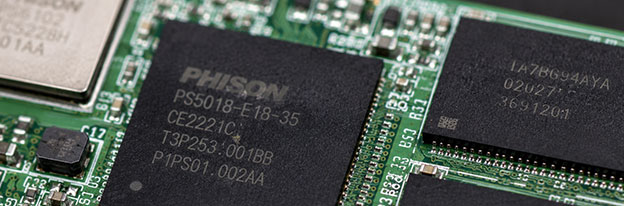
Aesonlabs provides professional data recovery from failed, damaged and non-responsive solid state drives. We recover data from SATA SSDs, M.2 SATA and NVMe drives, external solid state storage and other flash-based devices affected by controller failure, firmware corruption, NAND degradation, electronic faults, damaged translation tables, encryption-related complications and logical corruption.
SSD data recovery is fundamentally different from conventional hard drive recovery. There are no platters or read/write heads, but the absence of mechanical parts does not make a failed SSD simple to recover. Modern SSDs depend on a controller, firmware, NAND memory, internal translation tables and, increasingly, hardware encryption to turn the raw contents of the memory chips into the files seen by the operating system.
Controller-Based Recovery
Diagnosis Before a Recovery Method Is Chosen
Every SSD is diagnosed individually. The same symptom can be caused by very different failures: a non-detected drive may have a power fault, controller problem, damaged firmware, degraded NAND or another condition preventing normal initialization.
We identify the interface, controller family, NAND configuration and observed failure behaviour first. From there, the recovery path may involve board-level diagnosis, controller-specific technological access, firmware work, controlled imaging or filesystem reconstruction.
SSD Problems We Recover
Solid state drives can fail with very little warning. An SSD may work normally one day and become completely undetectable the next, while other drives begin freezing, disconnecting, reporting an incorrect capacity or entering a state where the controller responds but user data can no longer be accessed normally.
Detection Failure
SSD Not Detected
An SSD that disappears from BIOS, the operating system or a storage controller may have an electronic fault, damaged firmware, a failed controller, NAND-related problems or another failure preventing normal initialization.
A completely electrically dead SSD presents a different problem from one whose controller still responds diagnostically.
Abnormal Identification
Wrong Capacity or Generic Identification
Some failed SSDs continue to identify but report an incorrect capacity, generic information or otherwise abnormal parameters.
This can happen when the controller cannot correctly load or reconstruct the internal information required to translate logical addresses into physical NAND locations.
Instability
Freezing, Disconnecting or Extremely Slow SSDs
As NAND memory degrades, the controller may spend increasing amounts of time on error correction, unstable memory management and background operations.
Repeatedly restarting large file copies or running benchmarks can make an unstable recovery situation more difficult.
Electronic Failure
Power Circuit and PCB Problems
Voltage regulators, power-management components and supporting circuitry must operate correctly before the controller and NAND can initialize.
Power surges, failed components, liquid damage and shorted circuitry can leave an SSD apparently dead even when the NAND containing the data remains intact.
Controller & Firmware
Controller and Firmware Failures
If the controller cannot correctly initialize its firmware, service information or translation structures, the SSD may remain busy, report incorrect information or stop presenting user data entirely.
Supported controller families may provide specialized technological access unavailable through an ordinary SATA or NVMe connection.
Logical Data Loss
Formatting, Corruption, Deletion and TRIM
Data can also become inaccessible because of partition damage, filesystem corruption, accidental formatting or deletion while the SSD itself remains functional.
TRIM and garbage collection can make deleted-data recovery substantially different from magnetic hard drives.
Recovery Workflow
How Professional SSD Recovery Works
SSD recovery begins by determining what the device is actually doing electrically and logically rather than assuming that a non-detected drive has suffered NAND failure.
01
Diagnosis
The SSD is identified by interface, controller family, NAND configuration and observed failure behaviour.
02
Electronic & Controller Assessment
Power circuitry, PCB condition, controller response and technological recovery options are evaluated before deeper work begins.
03
Firmware & Technological Access
Supported controller families may allow specialized access to firmware structures, translation information and internal recovery functions.
04
Stabilization & Imaging
Once user data becomes accessible, readable contents are acquired to separate storage rather than repeatedly copied from the unstable source.
05
Filesystem Reconstruction
The acquired image is analyzed for partitions, filesystem structures, directories and files while the original failed SSD is preserved.
Interfaces & Form Factors
SATA, M.2 and NVMe SSD Recovery
The term M.2 describes a physical form factor and does not by itself identify how an SSD communicates. An M.2 SSD may use SATA or PCI Express/NVMe, so the actual interface must be identified before diagnostic equipment, adapters and recovery procedures are selected.
2.5-inch SATA SSDM.2 SATAM.2 PCIe NVMemSATAPCIe SSDSupported Apple SSDExternal / USB SSDEnterprise SSD
NVMe does not eliminate the underlying challenges found in other SSD technologies. NVMe drives still rely on controllers, NAND memory, firmware, translation mechanisms and supporting electronics, although recovery methods can differ substantially from older SATA SSDs.
Architecture Changes the Recovery Path
Why Two SSDs Can Require Completely Different Recovery Methods
Select a representative controller or architecture profile. The goal is to show which technical layers usually matter most: interface, controller family, translation behaviour, encryption, research depth and current tooling.
Selected Architecture2.5-inch SATA · SM2258-class
Controller-led path
Host InterfaceSATA Standard SATA communication path
ControllerSM2258-class Known controller family
NAND Storage
Logical data is typically reconstructed through the controller path
Translation / ECCKnown family behaviour FTL, ECC and NAND management stay controller-managed
◇
Encryption Layer May be present, but not the only recovery factor
↳
Direct NAND Path Usually secondary to controller-based access
Representative ProfileSATA
Researched SATA Controller Family
A researched controller family can provide controller-specific diagnostic and technological options. The exact controller, firmware and condition of the SSD still decide how useful those options are.
Controller-Specific Technology
SSD Controllers and PC-3000 Support
Advanced SSD recovery capability can depend heavily on the controller and firmware used inside the device. Aesonlabs uses professional PC-3000 SSD recovery technology for supported solid state drive families.
Support is determined by controller and firmware rather than simply by the brand printed on the SSD. Two drives carrying the same brand name may contain completely different controller and NAND combinations, while different brands may use closely related controller platforms.
An SSD that is not listed as supported by PC-3000 is not automatically considered unrecoverable. The first step is still determining why the device is inaccessible.
Electronic faults, power problems, initialization behaviour and other conditions can sometimes provide a recovery path even when there is no established controller-specific technological procedure. Unsupported cases are evaluated individually rather than rejected from a model list alone.
Critical Limitation
Encryption and Modern SSD Recovery
Many SSD controllers use hardware encryption internally as part of normal operation, even when the owner never deliberately enabled a password or full-disk encryption product. The relationship between the original controller, firmware, translation system and stored NAND data can therefore be critical to successful recovery.
Additional software encryption such as BitLocker or FileVault can add another layer. If the underlying SSD can be acquired successfully, access to encrypted user data may still require the appropriate password, recovery key or other credentials.
Removing NAND is not automatically the right recovery method. Modern SSD controllers can distribute data across multiple NAND devices, maintain complex translation structures, apply error correction and use hardware encryption. When controller-based access remains possible, preserving the original controller path can be far more useful than immediately moving to invasive chip-level methods.
NAND Memory Failures
NAND flash memory has a finite endurance and becomes increasingly difficult to read as cells wear or deteriorate. Modern controllers compensate through error correction, wear levelling, bad-block management, over-provisioning and other techniques that normally operate invisibly to the user.
During failure, degraded NAND can interfere with initialization, firmware structures or access to user data. Recovery depends on the SSD architecture, the condition of the NAND and whether the controller can still provide—or be made to provide—the translation necessary to reconstruct user data.
Logical SSD Recovery
Deleted Data, Formatting and TRIM
Not every SSD case involves failed electronics or firmware. Data can also become inaccessible because of partition damage, filesystem corruption, accidental formatting or deletion while the SSD itself remains functional.
When deleted blocks are released through TRIM and subsequently processed by the SSD's internal garbage-collection mechanisms, the underlying contents may no longer remain recoverable in the way deleted sectors sometimes remain recoverable on magnetic hard drives.
An SSD containing accidentally deleted or formatted data should therefore be powered down as soon as practical rather than continuing to run the operating system or installing recovery software onto the affected device.
Do not repeatedly power-cycle an SSD that is disappearing, freezing or failing to initialize.
Do not initialize or format the SSD because Windows or another operating system asks you to.
Do not run CHKDSK or filesystem-repair utilities before the physical condition of the SSD is understood.
Do not run benchmarks or stress tests on an unstable SSD.
Do not update the SSD firmware in an attempt to make an inaccessible drive work again.
Do not write new data to an SSD containing deleted or accidentally formatted information.
Do not assume that removing the NAND chips is automatically the correct recovery method.
The safest course depends on whether the problem is electronic, firmware-related, NAND-related or logical, which is why diagnosis comes first.
Why Aesonlabs
SSD Recovery Based on the Actual Controller and Failure
SSD recovery is performed directly by Aesonlabs rather than being forwarded to an unknown third-party laboratory. Each device is evaluated according to its controller, interface, NAND configuration and actual failure rather than simply by its advertised model.
Our SSD recovery work can involve electronic diagnosis, component-level troubleshooting, professional PC-3000 SSD technological access, controlled imaging and filesystem reconstruction.
Cases involving controllers without an established technological solution are also evaluated individually rather than automatically rejected because a particular model does not appear on a support list.
Frequently Asked Questions
SSD Data Recovery FAQ
Potentially. A completely non-responsive SSD can be affected by failed power circuitry, damaged electronic components, controller failure, firmware problems or NAND-related faults. Diagnosis is required to determine whether communication can be restored or another recovery method is available.
In many cases, yes. An SSD does not have to identify normally to a computer for professional recovery to be possible. Some controllers provide technological access through professional recovery equipment even when normal user access is unavailable, while electrically dead drives may first require component-level diagnosis.
Yes, depending on the controller, firmware, NAND condition and type of failure. NVMe describes the communication protocol and does not eliminate controller, firmware, electronic or NAND failures.
Lack of a controller-specific PC-3000 utility does not automatically mean recovery is impossible. The SSD is still evaluated for electronic faults, power problems, initialization behaviour and other conditions that may provide an alternative path to data access.
Potentially. Recovery depends on the type of encryption, condition of the SSD and availability of any required passwords or recovery keys.
Not necessarily. Modern SSD controllers may distribute data across several NAND devices, perform wear levelling and error correction, maintain complex translation structures and use hardware encryption. Reading the NAND chips directly therefore does not automatically produce usable logical data.
It depends on the SSD, controller, filesystem and what has occurred since deletion. Once TRIM has been issued and the affected blocks have been processed internally by the SSD, the previous contents may no longer be available.
No firmware update should be attempted on an SSD containing important inaccessible data unless the consequences are fully understood. Firmware updates are intended for normally functioning devices and can alter the state of the drive without resolving the underlying failure.
Recovery time depends on the controller, failure type, NAND condition, storage capacity, availability of technological support and whether electronic or component-level work is required. A more meaningful estimate can be provided after the SSD has been diagnosed.
Start a Recovery Case
Have a Failed SATA, M.2 or NVMe SSD?
Submit the SSD model and describe what happened before the data became inaccessible. We will evaluate the controller, interface and failure condition and determine the appropriate recovery procedure.